Kristina Schulz

Updated last week

Customize your trackpad gestures

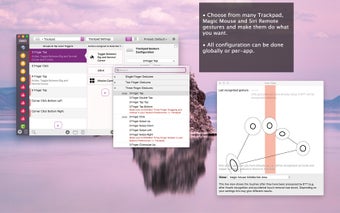
BetterTouchTool is a personalization application developed by Andreas Hegenberg for Mac users. Free to download and use, this tool allows users to customize different types of gestures in their trackpads. With it, you can modify the trackpad operation for the whole system or individual applications.

Top Recommended Alternative

However, users will find that BetterTouchTool is not for inexperienced users. Unlike Swish, which is quick and simple, this app is difficult to interpret outside the main menu. It also does not help that it lacks instructions for first-time users. Although once you get the hang of it, assigning functions will be easier.

Wide array of impressive features

For average Mac users, the trackpad's default functioning is sometimes frustrating. Some find it not particularly flexible, while others think it lacks essential features. Luckily, there are a chock-full of great Mac apps that can elevate your daily computing life. Among the growing list of utility apps is BetterTouchTool. As mentioned, this tool allows users to customize and configure their trackpad gestures completely. It even lets you create your own.

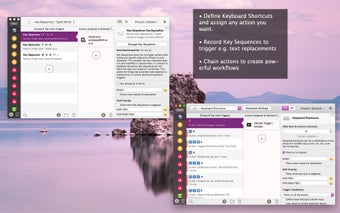
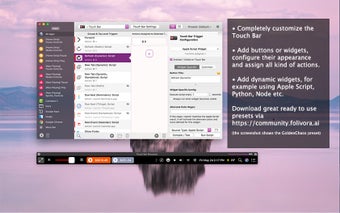
One of the things you will appreciate about the app is the range of input devices it lets you control. The app centers around input methods, assigning trigger sets to common items, such as a trackpad, Magic Mouse, or regular mouse, keyboard, and Touch Bar. Moreover, it also accepts input from paired Siri Remote, MIDI triggers, and key sequences. Even better, it also comes with a BTT remote, offering a way to receive remote input through a free Apple device app.

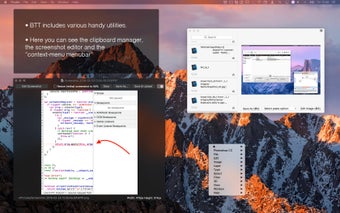
The program also allows users to create any shortcut by recording newly expanded shortcuts for any device. You can also dream up unusual key sequences, movement gestures, and even drawings to replace default options. Moreover, you can specify which app the shortcuts will apply to and which will be disabled. This tool also comes with an integrated clipboard manager to copy multiple items at once. It also comes with a screenshot tool allowing you to adjust images on the fly.

Not for the inexperienced

Available as freeware,  the software is easy to download and install. However, after initial startup, it will attempt to access all of the computers on the test network. Users will also notice the lack of instructions, which is a pity since understanding all its functions is not that simple. Additionally, the features are a little difficult to interpret outside the main menus. And although the overall interface is good, it can be a little confusing.

Users should also note that some modifications require system preferences changes. Additionally, the shortcuts you set up occasionally stop working. If that's the case, restarting the app from the menu bar should do the trick. However, you will be happy to know that the app comes in a lightweight package and works fast. It is also low maintenance and does not need constant updates.

A good app to improve productivity

Overall, BetterTouchTool is a must-try if you wish to improve your Mac computer's organization. The app functions well and gives users control of their device's gestures. It is also lightweight and does not require too much maintenance. However, understanding how each function works may be challenging for inexperienced users. It also does not help that the app lacks instructions, and there isn't that much information about the app available. 
Kristina Schulz

Kristina has professional experience in Europe, the United States, and Asia, specializing in communication and languages. She values adaptability in multicultural settings and brings this perspective to her writing. Her content reflects clarity, cross-cultural awareness, and practical expertise in connecting ideas through language.

  • Pros

    • Gives users control over their device's gestures
    • Wide selection of functions
    • Allows users to create their own shortcuts
    • Works with both Magic Trackpad and Magic Mouse
  • Cons

    • High learning curve
    • Some shortcuts stop working occasionally
    • Requires changes to the system preferences
 0/4

App specs

Program available in other languages


User reviews about BetterTouchTool

3.8

6 reviews

Add review

Main reviews for you

  • Anonymous user

    Almost perfect.. It can occasionally close itself and require relaunch, but overall is is reliable and has greatly enhanced my efficiency on the MAC. I wish it were included on every MAC. I use it that much!

  • Anonymous user

    Great, but stop with the almost daily updates.. I like it very much... but the nearly-daily updates are getting to be a bit much. How about once a week, or maybe even every month? I shouldn't have to update software all the time like this! OTHER than that, great tool, and I love it. Everyone with Snow Leopard should have this. Pros: Great flexibility, versatility, and ease-of-use. Cons: Too many updates! Bigger updates less frequently would be MUCH better!

  • Anonymous user

    Windows Magnet 100 times better. I used all of them, but i prefer Windows Magnet 80cents at appstore, simple the best of them !!! its more elegant and fast than other tools for same function and less price

  • Anonymous user

    Lion, BTT and SMART notebook don't work together. . Lion, BTT and SMART notebook don't work together. I had to remove BTT to make SMART functional again. Too bad, because I like BBT and got used to it. There was no problem with a Leopard, BTT and SMART combination. Hopefully a later update will make them compatible again.

  • Anonymous user

    It's a great utility, but.... ... when I had BTT running last time, I began to have my window scrollbars move without touching. Mostly, the window jumps up or down only a little, but it's tough when I'm writing in Word.But it's a great utility, and thanks for doing it!

  • Anonymous user

    Love it, but v.0.626 no longer launches. I guess I just clicked an "update available" popup and only noticed it wasn't running when I restarted yesterday. It's there in my apps folder but won't launch, nor is there a prefs drop-down in the menubar. Any ideas? Please? Can I downgrade? I miss it!

More

You may also like

Alternatives to BetterTouchTool

Explore Apps

Latest articles

Laws concerning the use of this software vary from country to country. We do not encourage or condone the use of this program if it is in violation of these laws.
Softonic

Is BetterTouchTool safe?

100/100

Score result: Clean

This file passed a comprehensive security scan using VirusTotal technology. It is safe to download.

  • Virus free
  • Spyware free
  • Malware free
  • Verified by Security Partners

    VirusTotal logo

Scan Info

Last scan
Tuesday, February 3, 2026
Scan provider
VirusTotal · Full report

File Integrity

File
BetterTouchTool_V6.124.zip
SHA256
1e309a95395b670c6ffaece87faa0cc1c1f8ec2030ac5db11ecef165c01ec91c
SHA1
d546e255be35d2bdedc4192c72183e776979bbad

Softonic security commitment

BetterTouchTool has been thoroughly scanned by our advanced security systems and verified by industry-leading partners. This file comes from the official developer and has passed all our security checks, showing no signs of viruses, malware, or spyware. For more information, visit our Security and Trust Center